 ForgeFlow
ForgeFlow / Reference
The ForgeFlow Workshop
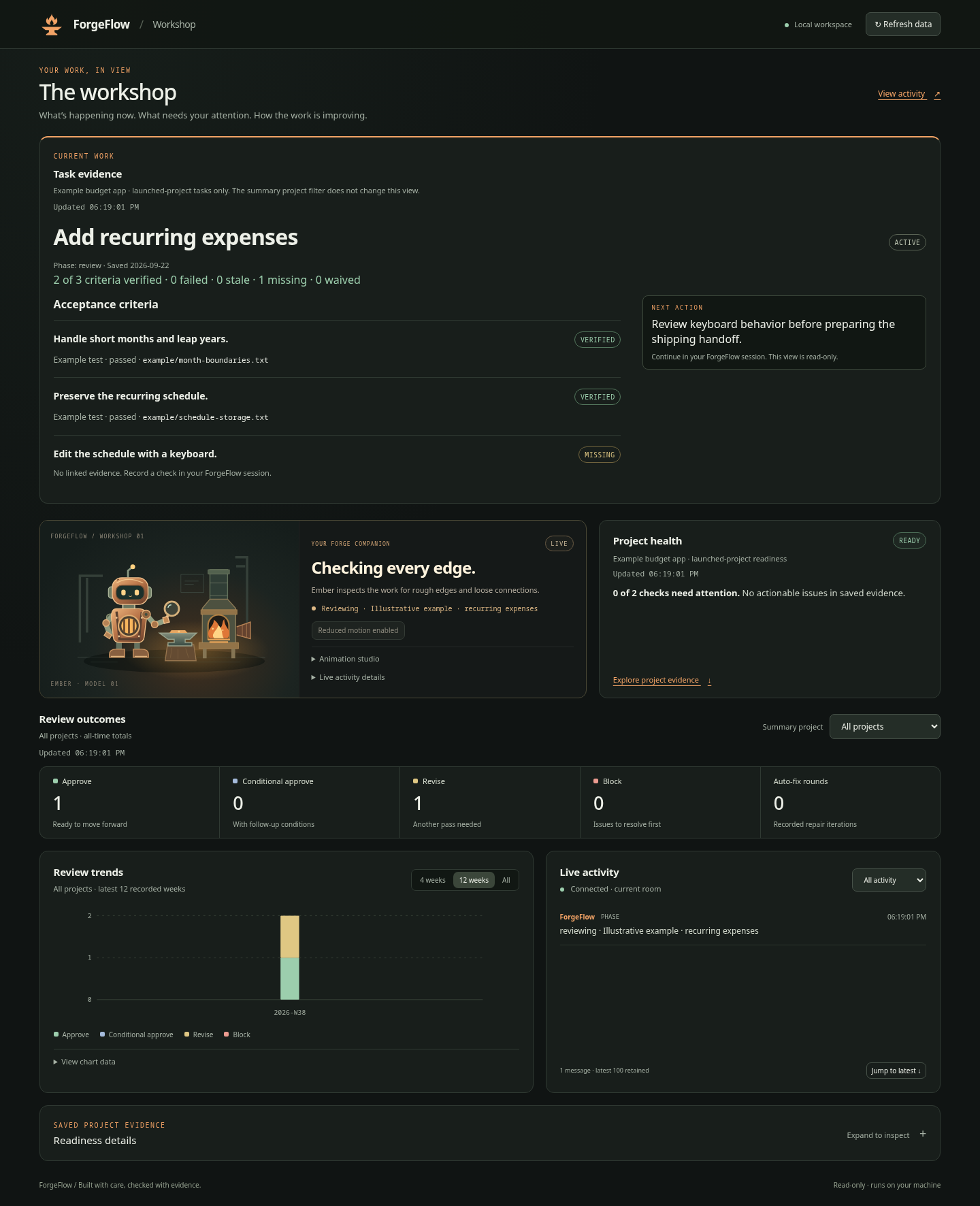
The workshop at http://127.0.0.1:4003/ combines task evidence, Ember, project readiness, review outcomes, trends, and live activity. It is optional; the main workflows work without it.
Start with the annotated visual guide or printable PDF.
Installation and startup checks
The template installer and updater prepare Ember for both Claude and Codex. They
install the services' locked dependencies using npm ci --ignore-scripts and
report setup problems without failing the core Forgeflow installation. Updates
also repair Ember setup when the managed source version is already current.
When upgrading with an older updater that predates Ember setup, run the newly
installed setup helper below without --check after the upgrade.
Claude setup adds the installed lean activation hook to UserPromptSubmit while
preserving existing hooks and settings. Changed settings are backed up under the
runtime home's forgeflow/backups/settings-before-ember-<hash>.json. Other hooks
and status-line settings remain user-managed. Codex setup checks the installed
workflow entry point; it does not change Codex configuration. Restart the host to
load changed hooks or skills. Managed-file rollback does not restore settings;
the separate settings backup is available for manual recovery.
Run a read-only readiness check using the installed runtime path:
node ~/.claude/forgeflow/scripts/forgeflow/ember-setup.js --target claude --check
node ~/.codex/forgeflow/scripts/forgeflow/ember-setup.js --target codex --check
Omit --check to repair dependencies and the Claude prompt hook. Use --home for
a nonstandard runtime home and --dry-run for a setup preview without writes or
package installation. Core workflows and local memory remain usable when npm,
the network, a desktop session, or the dashboard is unavailable.
The check reports missing dependencies/hooks, desktop availability, and ports 4000, 4001 and 4003. When available, OS diagnostics identify an occupying process and PID. Ports stay consistent across services and clients; Ember never kills another application or silently selects a different port. Inspect the owner and obtain permission before stopping it, then retry the workflow. If browser opening fails, use http://127.0.0.1:4003/ directly.
Set FORGEFLOW_DASHBOARD_AUTO_OPEN=off in the host environment to opt out. Claude's
settings environment and disableAllHooks are also respected during setup.
Headless, CI and SSH sessions skip browser opening. Failed service/browser attempts
can retry in the same session; only a successful opening consumes the automatic
opening for that session. A hook invocation requires an explicit supported workflow
command and a host session ID.
Opening the workshop
The first eligible ForgeFlow workflow invocation in a desktop session starts or reuses the dashboard and activity service, reports the phase, and opens your browser once. Later invocations ensure the services and update activity without opening another tab, even if you closed the first one.
Automatic startup requires installed dependencies and a stable host session ID. CI, SSH, headless Linux, and FORGEFLOW_DASHBOARD_AUTO_OPEN=off skip it. It never installs packages automatically.
For manual startup, run this from the repository whose readiness you want to see:
# Set this to your installed runtime. For Codex:
FF_RUNTIME="${CODEX_HOME:-$HOME/.codex}/forgeflow"
# For Claude Code, use "$HOME/.claude/forgeflow" instead.
node "$FF_RUNTIME/services/dashboard/server.js"
Claude Code also provides /dashboard. Start the activity service with $agent-chat-on in Codex or /agent-chat:on in Claude Code. Install missing service dependencies using the README setup steps.
Know each panel's scope
| Panel | Scope |
|---|---|
| Task evidence | Saved tasks in the repository that launched the dashboard |
| Ember and Live Activity | The activity service's current room |
| Project health and saved evidence | The repository that launched the dashboard |
| Review outcomes | All-time totals for the selected summary project |
| Review trends | All projects; latest 4, 12, or all recorded ISO weeks |
The summary project selector does not change readiness or the current activity room. A reused dashboard retains its launched project. To change that readiness scope, identify the existing service and deliberately restart it from the intended repository.
Refresh data fetches tasks, metrics, and readiness independently. Failed refreshes retain an existing snapshot and label it stale; an initial failure displays Unavailable. The live connection is independent of those fetches.
Task evidence and next action
Start with /task in Claude Code or $task in Codex. Select a saved task to inspect acceptance criteria, verified/failed/stale/missing/waived proof, phase history, and the next action. Source or artifact changes invalidate current proof while retaining the historical result. See Task Evidence and Recovery for the command and input contracts.
Task verification runs in a background worker, sharing repeated checks within each scan. Other dashboard requests remain responsive; overlapping refreshes share one active scan. A scan exceeding eight seconds reports an error and retains the last displayed snapshot. No new worker starts until the previous one finishes cleanup. The list supports up to 500 saved task records.
The task API is read-only and bound to the launched repository. Evidence paths are informational pointers; the dashboard does not serve arbitrary files or execute checks.
Ember and live activity
Ember follows explicit reports for planning, research, implementation, review, testing, waiting, failure, and completion. It watches, polishes, and dozes when idle. Success is never inferred from elapsed time. Active reports older than 90 seconds show Waiting for an update; disconnection shows Offline.
Animation studio previews change only the local pose and are labeled PREVIEW. Return to live to follow work again. Pause motion and system reduced-motion preferences do not pause incoming activity.
Live Activity displays reported phases and agent messages. It keeps a bounded recent feed, supports filtering, and avoids treating reconnect history as new announcements. If it is empty, check the connection, current room, selected filter, and whether the workflow has reported anything.
Readiness and missing evidence
The panel reads saved project guidance, context budgets, Lean readiness, host probes, benchmark evidence, failure digests, release readiness, and dogfood reports. Expand Saved project evidence for the individual status cards and checklist.
Missing optional evidence is informational, including unrecorded benchmarks, cross-host probes, release snapshots, or a failure digest before any failure was captured. Watch with zero actionable warnings can mean this optional evidence remains incomplete. Genuine saved blockers and corrupt evidence still require attention.
The next-action button copies a command. Paste it into your assistant when you want to act, then refresh the report after the correction. The dashboard does not execute commands, repair files, call GitHub, or spawn agents on your behalf.
Review outcomes and trends
Charts require saved verdicts. The default inputs are local metrics under ~/.claude/projects/ and ~/.codex/projects/; runtime-home and metrics-root overrides are respected.
Codex ForgeFlow review and implementation skills explicitly record actual Architect and Product Lead decisions with saved evidence and stable event IDs. Planning and testing activity do not create approvals. Older unrecorded reviews are not inferred or backfilled. Empty charts before the first recorded review are expected.
Separate chat view and stopping services
The activity service also serves a chat view at http://127.0.0.1:4001/ and uses local port 4000 for its other connections. Stop it with $agent-chat-off in Codex or /agent-chat:off in Claude Code.
Stop a foreground dashboard with Ctrl+C in its terminal. For an automatically started dashboard, identify and stop the verified process listening on 4003; do not trust an old PID file or terminate an unknown listener. A later eligible workflow entry may start the service again unless automatic startup is disabled.